For players in the United Kingdom, getting into an online casino should be straightforward: create an account, complete the required checks, and sign in securely. This guide looks at the Rhino Casino registration and login journey from a practical UK-player perspective. It covers the usual steps, what to do if access fails, and the checks worth making before depositing. Casino features and availability can change, so confirm current terms directly with the operator before you play.
Getting started: registration before login
You’ll need an account before you can use the casino login. Registration commonly begins with a form requesting details such as your name, date of birth, email address, mobile number and home address. Enter information accurately and use your legal details. Incorrect or inconsistent information can delay verification, restrict withdrawals, or prevent account access later.
Choose a strong, unique password that you do not use for email, banking or other casino accounts. If the site offers additional account-security features, consider enabling them. Keep your password private, and avoid signing in on a shared device unless you can securely log out and remove saved credentials afterwards.
Account verification and UK requirements
Online gambling operators serving customers in Great Britain are subject to licensing and consumer-protection requirements. An operator may need to verify your identity and age, and it can request documents or additional information if automated checks are not enough. This is a normal part of account security and compliance, not a reason to send documents through an unofficial channel.
Use only the casino’s official website or verified app, if one is offered. Before submitting personal information, check the operator’s terms, privacy notice, and licensing information. If anything about the address or branding seems suspicious, stop and verify that you are on the correct site. Never follow a login link from an unexpected message without checking its destination.
Rhino casino login: the usual steps
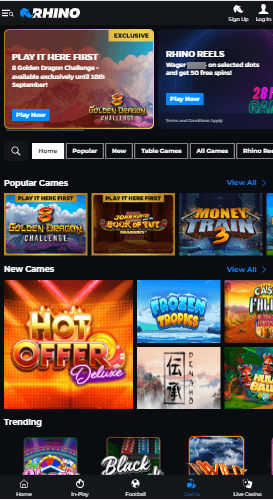
- Open the official Rhino Casino website or the operator’s verified app.
- Select the sign-in or login option.
- Enter the email address or username associated with your account and your password.
- Complete any security prompt or verification step shown on screen.
- Check that you have reached your account before viewing balances or making changes.
The exact layout may vary between desktop and mobile, and login options can change. If you are a returning player, use the credentials created during registration rather than opening another account. Multiple accounts may breach the operator’s rules and can complicate verification or payment requests.
Using the login on a phone
A mobile browser can be enough to access an online casino, but the experience depends on the site’s current design and your device. Type the website address yourself or use a saved, trusted bookmark. Check that the connection is secure and that the browser is up to date. Avoid public Wi-Fi for account or payment activity where possible, and never allow a shared device to save your password.
What if you can’t sign in?
Most login problems have a simple cause. Check that Caps Lock is off, confirm that the email address is spelled correctly, and make sure your internet connection is working. If the site reports a maintenance issue, wait and try again later rather than repeatedly submitting credentials.
- Forgotten password: Use the official password-reset link and follow the instructions sent to your registered email or phone. GBRhinologinUK App
- Account not verified: Review messages from the operator and submit requested information only through its secure account area or confirmed support channel.
- Temporary lock: Repeated unsuccessful attempts may trigger a security restriction. Follow the on-screen guidance or contact support;
- Page will not load: Try refreshing, updating your browser, or clearing the site’s cache. Avoid downloading software from unofficial sources.
- Account access restricted: Ask customer support for the reason and the appropriate next step. Do not create another account to get around a restriction.
When contacting support, explain the issue without sharing your password, full card details, or one-time security codes. A genuine support representative should not need your password. Keep a record of the date and any reference number in case you need to follow up.
Before you deposit: a UK-player checklist
A working login does not automatically mean a casino is suitable for you. First, verify that the operator is authorised to offer gambling services in your location. Check the terms for deposits, withdrawals, identity verification, bonus restrictions and account closure. Rules and payment options can differ, and a promotion that appears attractive may have conditions that affect how or when funds can be withdrawn.
- Confirm the operator’s licensing details and read its current terms.
- Check that the payment method is accepted and that the account name matches your own.
- Review deposit, loss and time-limit tools before playing.
- Understand any bonus wagering requirements and game exclusions;
- Set a spending limit you can afford and do not treat gambling as a way to make money.
In Great Britain, players can use operator-provided safer-gambling controls, which may include deposit limits, time reminders, time-outs and self-exclusion. The exact tools vary. If gambling stops being enjoyable or begins affecting your finances or wellbeing, pause and seek help from an appropriate support service. Do not try to recover losses by increasing your stakes.
Quick questions and answers
Can I use the same details on desktop and mobile?
Usually, an account can be accessed through supported devices using the same registered credentials. The operator’s current terms and available platforms determine what is supported. Use only official access points and keep your password secure.
What should I do if the password-reset email does not arrive?
Check your spam or junk folder and confirm that you entered the email address linked to the account. If it still does not arrive, contact the casino through its official support channel. Do not give your password to anyone claiming they can reset it for you.
Why might a casino request identity documents?
Identity checks help an operator confirm age, protect accounts and meet applicable obligations. Follow the instructions provided within the official site, and contact support if you are unsure which documents are accepted or how they should be uploaded.
Is it safe to stay logged in?
On a private device that you control, staying signed in may be convenient if the casino permits it. On shared or public devices, log out after use and do not save credentials. A strong device passcode adds another layer of protection.
Verdict: smooth when the basics are in place
The Rhino Casino login process should be familiar to anyone who has used an online account: register with accurate details, complete verification when requested, then sign in through the official site. The experience is likely to feel smooth if your credentials are correct and the operator’s systems are available. It can become frustrating when an account is incomplete, a password is forgotten, or verification takes longer than expected.
Before registering or depositing, take time to confirm that the service is currently available to you in the UK and that its licensing, terms and safer-gambling provisions meet your expectations. Keep control of your login details, ask support about unclear account restrictions, and gamble only with money you can afford to lose. A reliable login is useful, but responsible play and informed choices matter more than quick access.